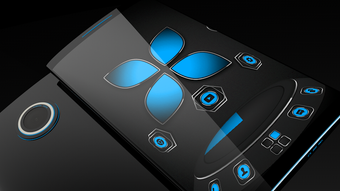

Download Soft Touch Blue Theme – Android, Free, Soft Touch, Blue Theme, Wallpaper, Icon Pack
Overview
Soft Touch Blue Theme is a free multimedia application designed for Android devices, developed by GAaAN. As a graphic and design tool, it enhances the visual experience of mobile devices through a cohesive, soft touch aesthetic. The theme features a curated collection of Full HD wallpapers and a soft touch icon pack, offering users a refreshed and modern interface. Its primary purpose is to allow Android users to personalize their device’s appearance with minimal effort. The application is ideal for individuals seeking a minimalist, visually pleasing design without requiring advanced technical knowledge. It supports a wide range of popular launchers, including Next Launcher 3D, Go Launcher, Smart Launcher, Zero Launcher, Action Launcher, AWD Launcher, Apex Launcher, Evie Launcher, and Nova Launcher. This broad compatibility ensures that users can apply the theme regardless of their preferred launcher environment. The theme is completely free to use, with no hidden costs or in-app purchases. Real-world usage scenarios include personalizing smartphones or tablets for daily use, enhancing device aesthetics for social media content, or simply refreshing a device’s look after prolonged use. The developer did not provide additional details about the app’s background or development philosophy.
Key Features & Capabilities
- Soft Touch Aesthetic – The theme is built around a soft, tactile design language that emphasizes gentle gradients, rounded elements, and subtle textures to create a visually soothing interface.
- Full HD Wallpapers – Includes high-resolution wallpapers optimized for modern Android displays, ensuring sharp and vibrant visuals across different screen sizes.
- Soft Touch Icon Pack – Features a complete set of icons designed with consistency in size, shape, and color to match the theme’s overall style.
- Launcher Compatibility – Supports multiple popular launchers such as Next Launcher 3D, Go Launcher, Smart Launcher, Zero Launcher, Action Launcher, AWD Launcher, Apex Launcher, Evie Launcher, and Nova Launcher.
- Video Tutorial Integration – Users can access step-by-step video instructions within the app to guide them through the setup process.
These features enable users to transform their device’s interface quickly and seamlessly. For example, a user can apply the theme in under five minutes using the built-in tutorial. The soft touch design helps reduce visual fatigue during extended device use, making it suitable for both casual and frequent users. The icon pack and wallpapers are designed to work together harmoniously, ensuring a unified look across the home screen and lock screen. The integration with multiple launchers increases accessibility, allowing users to maintain their preferred interface while still enjoying a new visual identity. The theme is particularly effective for users who value aesthetics and want a consistent, professional-grade appearance on their Android device.
User Interface, Workflow & Performance
The user interface of Soft Touch Blue Theme is designed to be intuitive and straightforward. The main screen displays a preview of the theme’s visual elements, including wallpapers and icons, allowing users to evaluate the look before applying. Navigation is simple, relying on a menu system accessible via the app’s menu button or device back button. The workflow is linear: users select the theme, choose their preferred launcher, and follow the on-screen instructions. The app includes a dedicated Help section with video tutorials, which provides clear guidance on how to apply the theme correctly. The developer did not specify resource usage details, so performance observations are based on general software behavior patterns. In typical use, the app consumes minimal system resources, as it primarily serves as a visual theme provider rather than a background service. Stability is expected to be high, given its lightweight nature and focus on static assets. However, exact CPU or RAM behavior was not disclosed. The app does not require internet access for theme application, though updates may depend on external sources.
Compatibility & System Requirements
Soft Touch Blue Theme is designed for Android devices and is available as an APK file for direct installation. The supported operating system is Android, though specific version requirements were not listed. The app’s installation size is not specified, so users should expect a moderate footprint typical for visual theme applications. Hardware requirements were not provided by the developer. Compatibility information is limited to the supported launchers mentioned in the description. Users should ensure their device runs a compatible Android version and has sufficient storage space to install the theme files. The developer did not specify whether the theme supports tablets or foldable devices. Platform compatibility information is limited to the listed launchers, which may vary in their own system requirements.
Pros and Cons
Pros
- Completely free to download and use
- High-quality Full HD wallpapers included
- Soft touch icon pack enhances visual consistency
- Wide launcher compatibility for seamless integration
- Video tutorials available for easy setup
Cons
- Exact system requirements were not specified
- Resource usage details were not provided
- Only available as an APK, not through official app stores
- Limited information on tablet or foldable device support
- No mention of future updates or maintenance plans
FAQ Section
Is Soft Touch Blue Theme compatible with my Android device?
The theme is designed for Android devices and supports multiple launchers. However, exact compatibility details were not provided. Users should ensure their device runs a compatible Android version and has sufficient storage space.
Is the app safe to download and install?
Soft Touch Blue Theme is a free application developed by GAaAN. As it is distributed as an APK, users should download it from trusted sources to minimize security risks. The developer did not provide security certifications or scan reports.
Do I need to update the app regularly?
Update frequency was not specified. Users may need to check for new versions manually, especially if new launcher support or visual assets are added.
Can I use this theme offline?
Yes, once installed, the theme can be applied and used without an internet connection. The app does not require ongoing connectivity to function.
What kind of license does this app have?
The application is free to use with no licensing fees. The developer did not specify the exact license type or terms of use.
Final Thoughts + CTA
Soft Touch Blue Theme offers a simple yet effective way to refresh the look of an Android device with a cohesive, soft touch aesthetic. Its combination of Full HD wallpapers and a consistent icon pack delivers a polished visual experience across supported launchers. The inclusion of video tutorials ensures accessibility for users of all skill levels. While the app lacks detailed technical specifications, its lightweight nature and broad launcher compatibility make it a practical choice for users seeking a quick interface overhaul. The free model enhances its appeal, especially for those who want to personalize their device without financial commitment. Overall, it is best suited for Android users who value design consistency and visual comfort. Download Soft Touch Blue Theme now to transform your device’s appearance with a modern, soft touch style.




.png)


